Block Mode
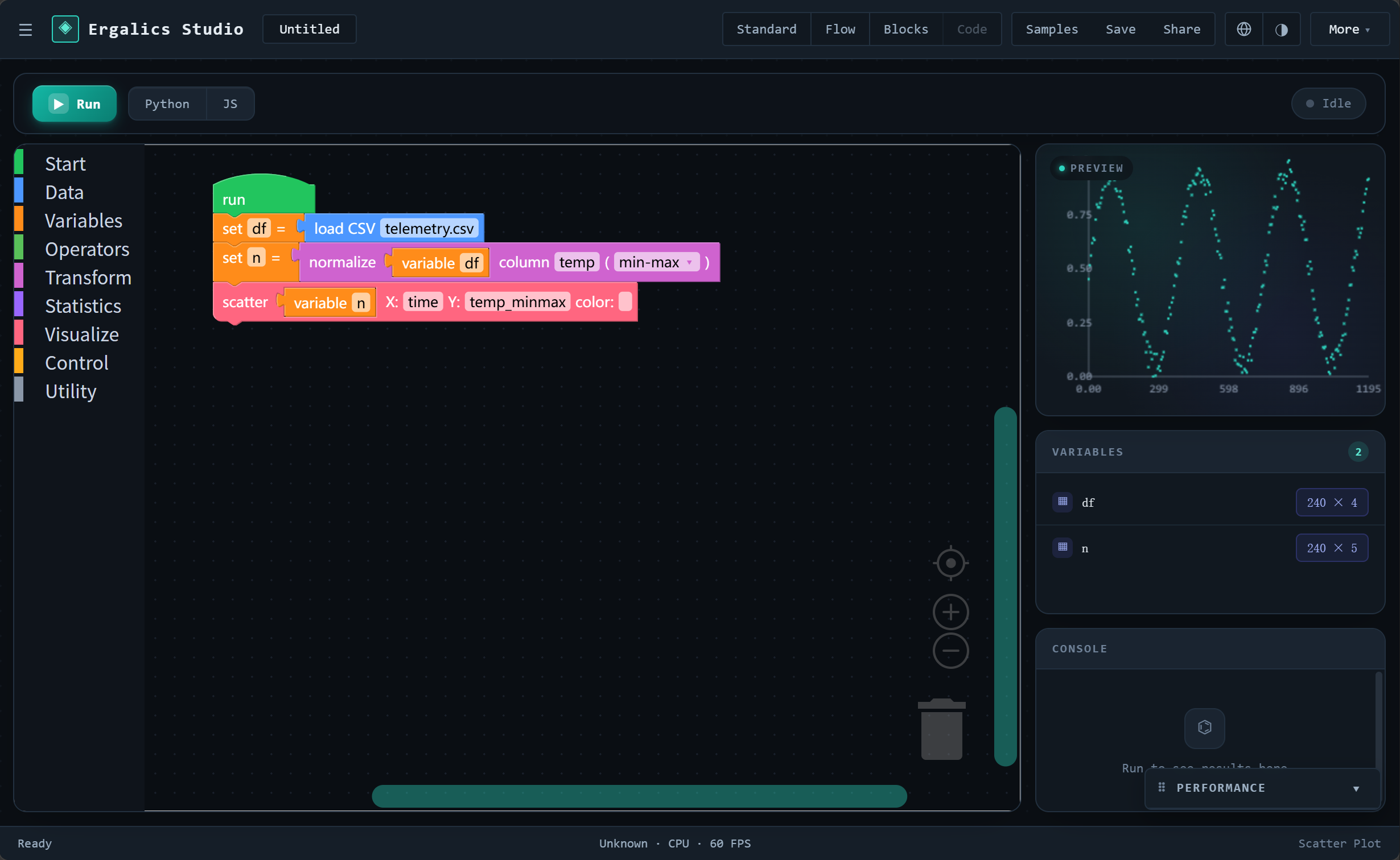
Block mode is Ergalics Studio's third workbench mode, sitting next to Standard and Flow. It is a Scratch-style block editor — you snap blocks together on a canvas, drop a single green 「运行时 / Run」hat block on top, and the runtime walks the IR underneath it. The hat is the only execution entry point, so orphan blocks never run and a half-built program cannot "fall through" into unintended code.
It is the path of least resistance for:
- learners (no syntax, no typed ports — just snap and run);
- scripters who prefer an imperative feel to Flow mode's DAG;
- anyone exploring a dataset who wants a tight
load → transform → plotloop in one screen.
The workbench top bar carries a four-slot cluster Standard | Flow | Blocks | Code. Today Blocks is enabled, Code is reserved (the IR is in place; Monaco + Pyodide land in a later phase).
Why a new mode
Flow mode already does "compose blocks → run → see every node's output", but it does it as a declarative DAG: nodes are typed, ports are typed, the executor is a topological sort. That is great for data engineers and bad for a 10-year-old (or anyone who would rather say "set df = load telemetry.csv; normalize df; scatter df").
Block mode is the imperative, top-down twin: blocks snap under a hat, the interpreter walks top-to-bottom, and studio.plot('scatter', df, ...) lands in the very same scatter plugin a Flow-mode viz.scatter block does. The two modes share the runtime data contract (DataTable / Scalar / RenderedView from src/types/datatable.ts) and the plugin bridge (src/blocks/render.ts → plugin.loadData(file)), so anything a Flow-mode pipeline can produce, a Block-mode script can produce too.
The shared IR
The architectural pivot is a shared intermediate representation — src/editor/ir/. Every Block mode workspace is round-tripped through IRProgram (a list of IRNodes), and the same IR is what a future Code mode will edit. Blockly JSON ⇄ IR lives in src/editor/block/convert.ts; the rest of the system speaks IR only.
The IR is intentionally small:
- Statement nodes —
VarAssign,PlotScatter,PlotLine,PlotHistogram,PlotPointCloud,If,Repeat,While,ForEach,StudioCall(e.g.print),RawCode(degraded nodes we can't yet represent). - Expression nodes —
LoadCSV,LoadXYZ,Random,Range,Normalize,Sort,Select,Filter,AddColumn,Summary,Histogram,Var,Number,String,Boolean,BinaryOp,UnaryOp,List,ListIndex,Function,Call. - Helpers —
makeProgram(body, variables, lang)is the only constructor;hashIR(program)(FNV-1a, synchronous) fingerprints a program for cache invalidation;validateIR(program)walks the tree and returns structureddiagnosticsinstead of throwing.
Why FNV-1a and not SHA-1? Because IR hashing runs on every keystroke in the Blockly workspace. WebCrypto's SHA-1 is asynchronous and would force the make / validate / run path into microtask hops for no security gain — hashIR is for cache-busting, not security.
The pipeline
Blockly workspace JSON
        │
        ▼   src/editor/block/convert.ts (pure)
       IRProgram
        │
   ┌────┴────────────────────────┐
   ▼                              ▼
src/editor/runtime/        src/editor/codegen/
  interpreter.ts              js.ts · python.ts
   │                              │
   ▼                              ▼
StudioApi                      emitted code
   │
   ▼
plugin.loadData(File)  ← src/blocks/render.ts bridge
   │
   ▼
the scatter / histogram / … plugin (already in use by Flow mode)
Three things to notice:
- One bridge, two callers. Both the Flow-mode
viz.*blocks and the Block-modestudio.plot(...)call land inrender.ts→plugin.loadData(file). Adding a visualisation to Flow mode automatically lights up astudio.plotvariant in Block mode. - The interpreter and the codegen share the IR shape, not the source.
codegenJS/codegenPythonare pure functions that walk the same node union; the interpreter does the same walk at runtime. They never drift because they parse the same data. - Block mode is lazy-loaded.
BlockEditorandCodeEditorareReact.lazy(...)-imported inWorkbenchPage, and Blockly itself is a ~828 KB on-demand chunk. Standard / Flow first paint is unaffected.
StudioApi — the host-facing surface
src/editor/runtime/studio-api.ts defines the StudioApi that block-mode programs see:
studio.load(path) / loadCSV(text) / loadXYZ(text)   // data sources
studio.random(n, seed) / range(start, stop, step)   // generated tables
studio.normalize(df, column, mode)                  // transforms
studio.sort(df, column, dir) / select(df, cols) /
  filter(df, column, op, value) / addColumn(df, name, values)
studio.summary(df, column) / histogram(df, column, bins)  // statistics
studio.plot(type, df, opts)                         // viz → plugin bridge
studio.notify(kind, msg) / studio.print(...args)    // host interaction
studio.getParam(key) / studio.setParam(key, value)  // project-scoped
The implementation reuses src/blocks/ops for every transform and statistic, so a studio.normalize is the same normalize operator that a Flow-mode transform.normalize block invokes. There is exactly one truth for "what does normalise do", and Block mode does not duplicate it.
The visualisations route through src/blocks/render.ts (renderView(view, host)), which constructs a File from the column-serialised text and hands it to plugin.loadData. Plot types map to plugin ids in one place (PLOT_PLUGINS inside studio-api.ts): scatter → example.scatter, line → example.timeseries, histogram → example.histogram, pointcloud → example.point-cloud.
The interpreter
src/editor/runtime/interpreter.ts walks the IR top-to-bottom:
VarAssignwrites into a variable table.PlotScatter/PlotLine/PlotHistogram/PlotPointCloudbuild aRenderedView, callstudio.plot(...), which fans out to the plugin.If/Repeat/While/ForEachexecute their body in order with a fresh sub-scope.StudioCall { method: 'print' }writes to the console panel.RawCode(astudio_rawBlockly block) is what we degrade to when an IR shape we cannot yet represent appears (e.g. an exotic block in a user's saved program). It runs verbatim throughnew Function.
The interpreter returns an InterpretResult with { ok, variables, output } and propagates console / error into the editor store. The VariablePanel and ConsolePanel cards in the right column read from that store directly — no React state to keep in sync.
IR ↔ Blockly
src/editor/block/convert.ts does both directions and is exercised in Node by tests/editor/block-ir.test.ts:
blockJSONToIR(b)— one block → one IR node.irToBlockJSON(node)— one IR node → one block.workspaceJSONToIR(workspace)— full workspace →IRProgram.irToWorkspaceJSON(program)—IRProgram→ full workspace.
The bidirectional round-trip is the contract: any program the user can build in the Blockly canvas can be serialised and rehydrated losslessly. Orphan blocks (anything outside a studio_run hat chain) are dropped on serialise — only the body of the active Run hat makes it into the IR. That is what guarantees "broken code never runs": the canvas may visually have loose blocks, but the runtime only ever sees what is connected.
When a node has no Blockly equivalent yet (anything we don't ship in blocks.ts), it is wrapped in a studio_raw block with the IR serialised into a multiline text field. Today that catch-all is rarely hit because we ship 40+ blocks; it is in place so future additions don't silently break old workspaces.
Built-in blocks
src/editor/block/blocks.ts defines the catalogue (40+ entries). They are laid out into nine toolbox categories (src/editor/block/toolbox.ts), each with a colour matching the Scratch convention:
| Category | Colour | Blocks |
|---|---|---|
| 启动 / Start | green | studio_run (the hat — only entry point) |
| 数据 / Data | blue | studio_load_csv, studio_load_xyz, studio_random, studio_range, studio_list, studio_list_index |
| 变量 / Variables | orange | studio_var, studio_var_assign |
| 运算 / Operators | green | studio_number, studio_string, studio_boolean, studio_math_op, studio_compare, studio_logic_op, studio_unary |
| 变换 / Transform | pink | studio_normalize, studio_sort, studio_select, studio_filter |
| 统计 / Statistics | purple | studio_summary, studio_histogram |
| 可视化 / Visualize | red | studio_plot_scatter, studio_line, studio_plot_histogram, studio_plot_pointcloud |
| 控制 / Control | yellow | studio_repeat, studio_while, studio_for_each, studio_if |
| 工具 / Utility | gray | studio_print |
All block names, tooltips, dropdown options, and toolbox category names go through Blockly's %{BKY_*} message system (src/editor/block/i18n.ts), backed by a zh-CN and an en-US dictionary. Switching language re-creates the workspace so every block is re-labelled — verified by tests/editor/block-i18n.test.ts.
Theme
src/editor/block/theme.ts ships studio-kids, a custom Blockly theme that matches Ergalics' "instrument console" surface: dark graphite canvas, teal accent for the selection glow, and an Inter / PingFang SC font stack so block labels don't inherit the app's monospace stack and balloon in width.
Samples
src/editor/block/samples.ts ships five programs that load with one click from the Examples dialog (top-bar Samples button → "Block samples" tab):
| Sample id | What it shows |
|---|---|
galaxy-scatter | load XYZ galaxy.dat → scatter (X/Y as the file's columns) |
telemetry-line | load CSV telemetry.csv → normalize a column min-max → line plot |
random-histogram | random 500 → histogram of the first column |
normalize-scatter | load XYZ → normalize a column → scatter the normalised values |
repeat-print | repeat 10 → print "hello" — the canonical "is this loop alive?" hello world |
The samples are loaded into the workspace via loadIRIntoWorkspace and also written into the active session's IR, so closing and reopening the project keeps them around.
Persistence
Block mode sessions ride on the standard project plumbing:
ProjectState.editorSessions: EditorSession[]— every Block / Code session (with its IR) is part of the project.ProjectState.activeEditorSession: string | null— which session the user is currently editing.ProjectState.workbenchMode: 'standard' | 'flow' | 'block' | 'code'— which mode the top-bar cluster was last on.
projectStore.applyEditor() snapshots editorStore into the project before save; restoreEditor() rehydrates sessions on open. Because Blockly 13 is lazy-loaded, this happens off the critical path for projects that don't use Block mode — the chunk only loads when a Block session is restored.
Extending: writing a new block
Three files are touched, in this order:
src/editor/block/i18n.ts— add aSTUDIO_MY_BLOCKkey to bothzh-CNanden-US(the unit test enforces both dictionaries are in sync).src/editor/block/blocks.ts— append aBlockDeftoBLOCK_DEFS(type,message0, args,output/previousStatement/nextStatement, colour, tooltip).colourshould match the Scratch palette to keep the toolbox consistent.src/editor/block/convert.ts— add acase 'studio_my_block':branch inblockJSONToIRreturning the IR node, and the inversecase '<IRNodeKind>':inirToBlockJSON.
If the block needs an executor-side helper, add it to studio-api.ts and the interpreter together — codegen and the runtime should accept it identically, so the new IR node shape is added to both walk-throughs simultaneously. Run tests/editor/ to confirm everything round-trips.
Known limitations
- Code mode (Python via Pyodide, R via webR, JS via the IR engine) is fully wired up (Monaco editor, REPL,
studiomodule, 9 sample programs; R runs on a vendored webR bundle inpublic/webr/and falls back to the IR engine when absent). Bidirectional block ↔ code sync remains on the roadmap. - User-loaded files are not yet project-scoped.
studio.load('foo.dat')resolves files fromexamples/data/only — drag-and-drop files do not yet land inProjectState.data.filesfor block sessions (code mode injects project files via_FILESper run). - Block names re-render only on workspace recreation. Locale switches unmount / remount the Blockly workspace so the new language takes effect immediately; this works but is heavier than a pure string swap (acceptable for a single-user app; revisit if profile-switching becomes hot).
- No GPU execution path yet. The interpreter runs on CPU. The IR shape was designed so a
gpu.*node family can land without breaking codegen — samedata: IRNodeshape as every transform — but the worker-side runner and the GPU dispatch are not wired. - Unrepresentable nodes degrade to
RawCode. If you build a pipeline with a future node shape, it is preserved verbatim and runs asnew Function(...). This is the explicit fallback for forward compatibility — not a bug, but worth knowing.